首选进入seafile管理页面 设置SERVICE_URL和FILE_SERVER_ROOT的url(仅限seafile 高版本11,seafile12、13不支持web界面修改)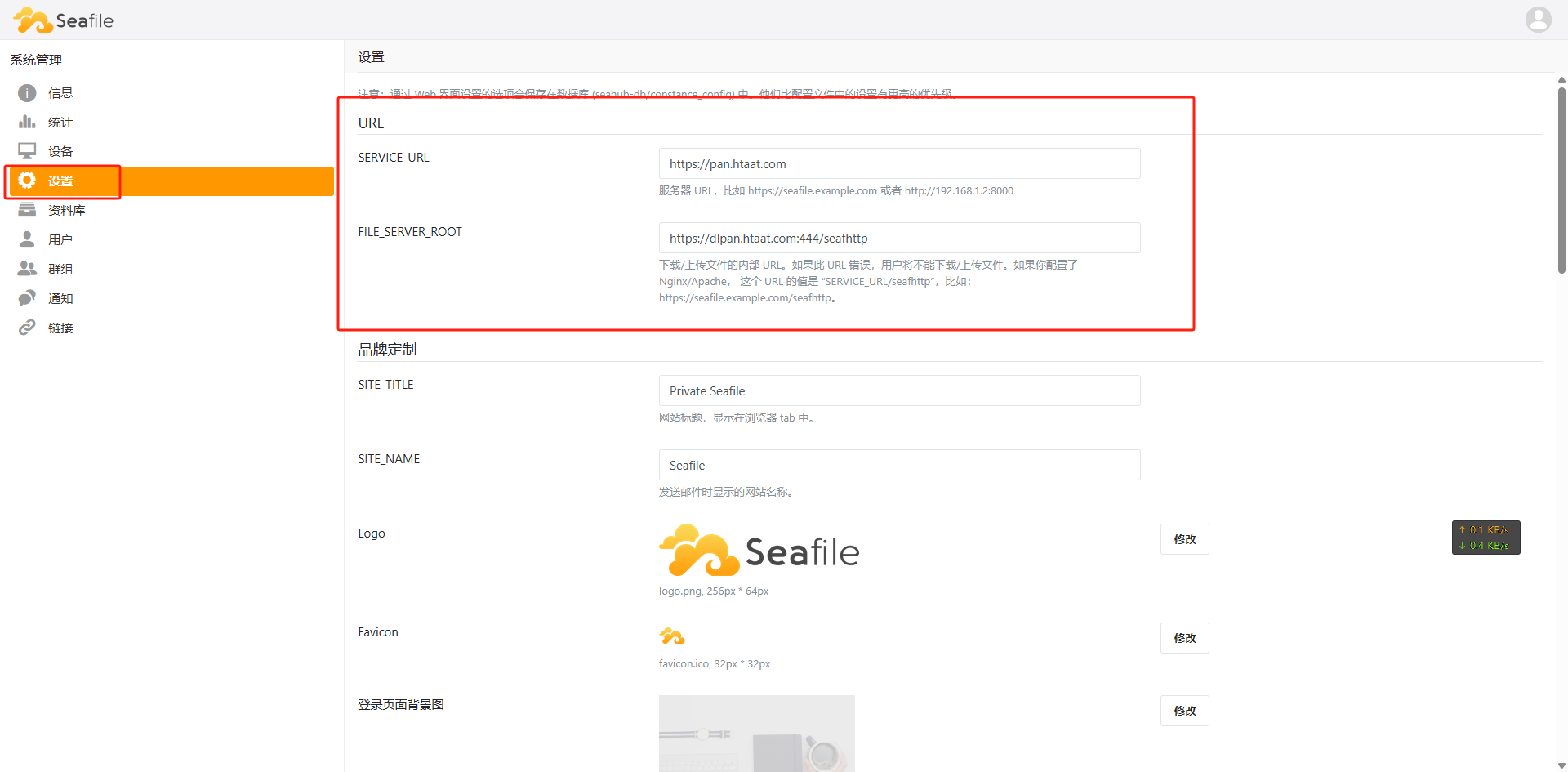
修改完成后进入seafile 容器修改seahub_settings.py文件
docker exec -it seafile /bin/bash

vi /opt/seafile/conf/seahub_settings.py
将你设置的SERVICE_URL和FILE_SERVER_ROOT 填进去 然后保存重启seafile容器
CORS_ORIGIN_WHITELIST = (
    'https://pan.htaat.com',
)
CORS_ALLOW_CREDENTIALS = True
CSRF_TRUSTED_ORIGINS = [
    'https://pan.htaat.com',
    'https://dlpan.htaat.com:444'
]
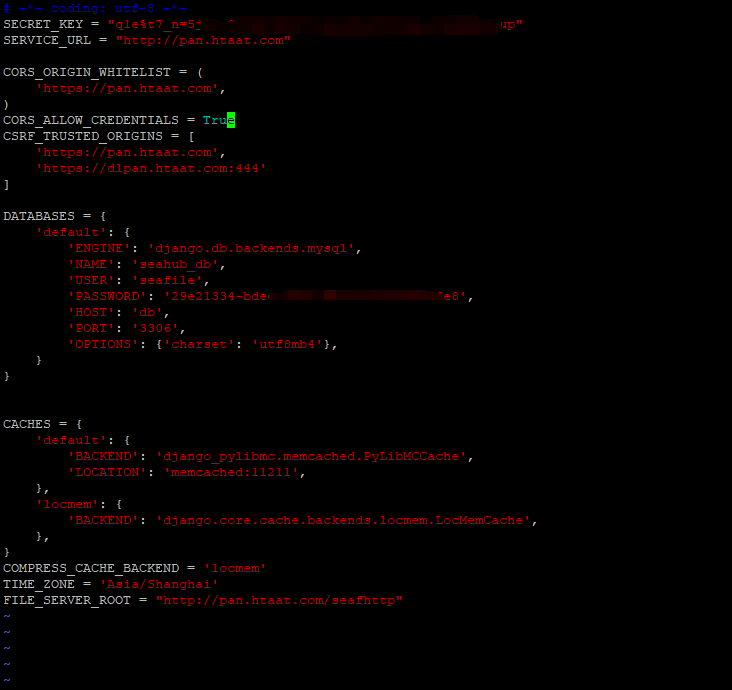
如果你出口就是seafile的话,教程到这里就结束了。我这边出口是有一台nginx反代服务器的,但你的网络结构和我的一样的话,那就还需要配置出口nginx的跨域
所有我要到nginx做跨域配置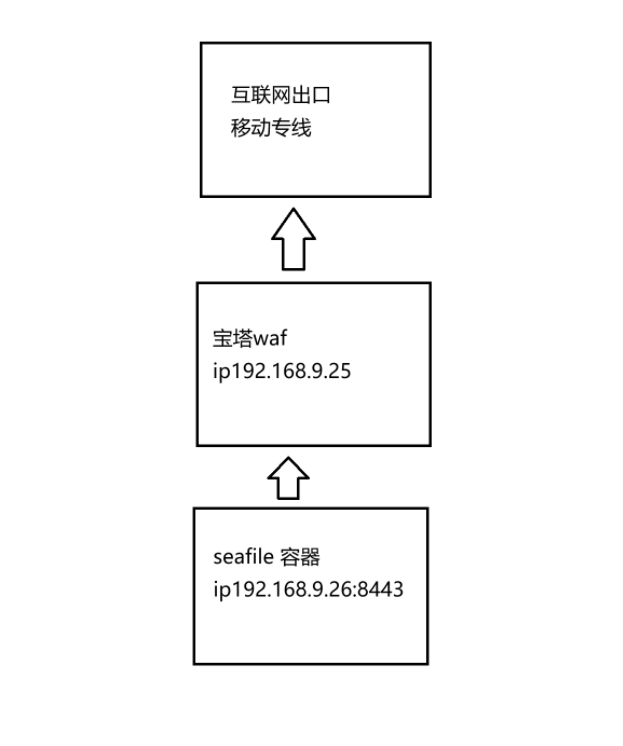
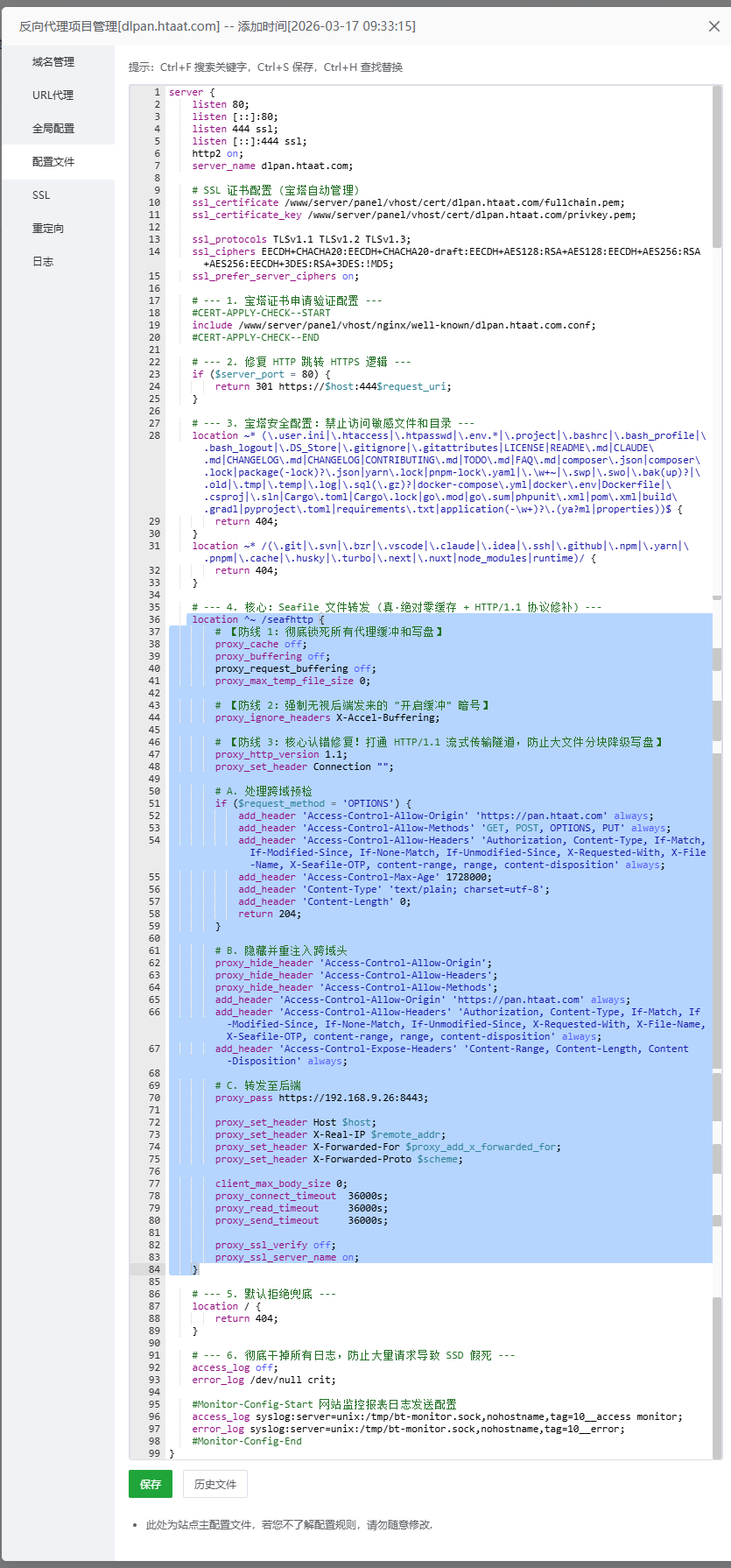
找到你反代服务器的FILE_SERVER_ROOT域名的站点 把下面配置加到nginx配置上 然后重启就好了
注意proxy_pass https://192.168.9.26:8443; 这里记得修改成你的上游端口(就是你内网访问seafile的ip(域名)+端口号)
 location ^~ /seafhttp {
        # 【防线 1:彻底锁死所有代理缓冲和写盘】
        proxy_cache off;
        proxy_buffering off;
        proxy_request_buffering off;
        proxy_max_temp_file_size 0;

        # 【防线 2:强制无视后端发来的 "开启缓冲" 暗号】
        proxy_ignore_headers X-Accel-Buffering;

        # 【防线 3:核心认错修复!打通 HTTP/1.1 流式传输隧道,防止大文件分块降级写盘】
        proxy_http_version 1.1;
        proxy_set_header Connection "";

        # A. 处理跨域预检
        if ($request_method = 'OPTIONS') {
            add_header 'Access-Control-Allow-Origin' 'https://pan.htaat.com' always;
            add_header 'Access-Control-Allow-Methods' 'GET, POST, OPTIONS, PUT' always;
            add_header 'Access-Control-Allow-Headers' 'Authorization, Content-Type, If-Match, If-Modified-Since, If-None-Match, If-Unmodified-Since, X-Requested-With, X-File-Name, X-Seafile-OTP, content-range, range, content-disposition' always;
            add_header 'Access-Control-Max-Age' 1728000;
            add_header 'Content-Type' 'text/plain; charset=utf-8';
            add_header 'Content-Length' 0;
            return 204;
        }

        # B. 隐藏并重注入跨域头
        proxy_hide_header 'Access-Control-Allow-Origin';
        proxy_hide_header 'Access-Control-Allow-Headers';
        proxy_hide_header 'Access-Control-Allow-Methods';
        add_header 'Access-Control-Allow-Origin' 'https://pan.htaat.com' always;
        add_header 'Access-Control-Allow-Headers' 'Authorization, Content-Type, If-Match, If-Modified-Since, If-None-Match, If-Unmodified-Since, X-Requested-With, X-File-Name, X-Seafile-OTP, content-range, range, content-disposition' always;
        add_header 'Access-Control-Expose-Headers' 'Content-Range, Content-Length, Content-Disposition' always;

        # C. 转发至后端
        proxy_pass https://192.168.9.26:8443;#记得修改成你的上游端口就是你的容器ip和端口

        proxy_set_header Host $host;
        proxy_set_header X-Real-IP $remote_addr;
        proxy_set_header X-Forwarded-For $proxy_add_x_forwarded_for;
        proxy_set_header X-Forwarded-Proto $scheme;

        client_max_body_size 0;
        proxy_connect_timeout  36000s;
        proxy_read_timeout     36000s;
        proxy_send_timeout     36000s;

        proxy_ssl_verify off;
        proxy_ssl_server_name on;
    }
我这边是出口的nginx也是把缓存给关掉,如果上传下载没有速度的话可以将下面的代码给删掉
       # 【防线 1:彻底锁死所有代理缓冲和写盘】
        proxy_cache off;
        proxy_buffering off;
        proxy_request_buffering off;
        proxy_max_temp_file_size 0;

        # 【防线 2:强制无视后端发来的 "开启缓冲" 暗号】
        proxy_ignore_headers X-Accel-Buffering;

        # 【防线 3:核心认错修复!打通 HTTP/1.1 流式传输隧道,防止大文件分块降级写盘】
        proxy_http_version 1.1;
        proxy_set_header Connection "";


评论已关闭